CUDA foundation
CUDA foundation
1. Hardware intro
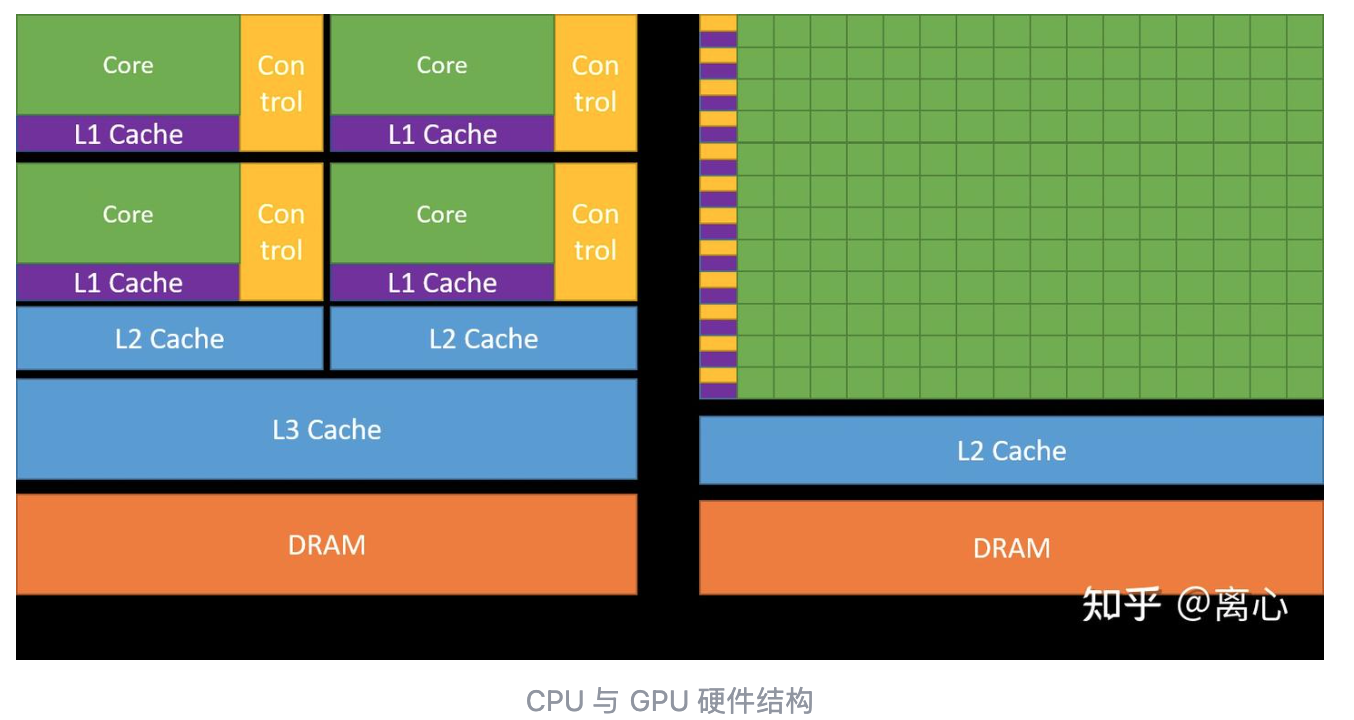
- Left: CPU architecture; right: GPU architecture
- Green: core, ALU (algorithmic logic unit); yellow: control; purple: L1 cache; blue: L2 and above cache; orange: DRAM (VRAM is one type of DRAM, dynamic random-access memory)
- Usually, CPU DRAM and GPU DRAM are connected by PCIe bus (总线).
GPU compute is usually not purely done by GPU, it is about CPU orchestrate and GPU compute together. Heterogeneous computing task. In this case, CPU is called host, and GPU is called device.
CUDA program structure
It is a file ending with .cu , compiled by compiler like nvcc
int main() {
    host code;
    kernel function launch;
    host code;
    kernel function launch;
    ......
    return 0;
}

__global__ void kernel_function_1(parameters) {
    ......
}

__global__ void kernel_function_2(parameters) {
    ......
}

......
In main function, we interleave write host code and kernel launches («<»>). Host code is in charge of CPU and its memory management, task orchestration, and kernel function launch is mainly to do the major computation.
__global__ is used to define a kernel. In CUDA, kernel can only be of void type, which means when we need to return the result, we should have one pointer in the input variable list to save the result in that memory address.
Besides __global__ , the functions in CUDA program can be decorated by __device__ and __host__: __device__ deco is for device function, which can only be used by the kernel or other device function, only run in device; __host__ is host functions, like normal C++ functions
Data flow between host and device
Data transfer is the preparation of CUDA parallel computing, this is because CUDA kernel function input variable must be pointers to device memory. Hence, we first need to allocate device memory and init it in host code. Allocate device memory can use cudaMalloc function, and initialize device memory can be done by copying host memory to the allocated device memory, by using cudaMemcpy
cudaError_t cudaMalloc(void** d_ptr, unsigned int size);
cudaError_t cudaMemcpy(void* d_ptr, void* h_ptr, unsigned int size, enum cudaMemcpyKind)
A usual way of using cudaMalloc is
float* d_x = nullptr;
cudaMalloc((void**)&d_x, nbytes);
Here d_x is pointer itself, it lives on CPU, it is to save a memory address (one or more floats’ address in memory). d_x has its own address in memory. cudaMalloc will try to change that memory address from CPU to GPU, hence change the value (memory address) saved d_x . The way it can be done in C/C++ is to take the pointer to d_x, i.e., &d_x double pointer, as input, and change the value in that memory address directly.
cudaMemcpy ’s first input var is a pointer to device memory, second one is a pointer to host memory, last one enum is to define the direction of cpy, which has 5 options (top 2 most commonly seen)
cudaMemcpyHostToDevicecudaMemcpyDeviceToHostcudaMemcpyHostToHostcudaMemcpyDeviceToDevicecudaMemcpyDefault
Example
Here we use CUDA to do vector summarization, h_x + h_y = h_z . And we first need to copy h_x, h_y to d_x, d_y
double *h_x = (double*) malloc(M);
double *h_y = (double*) malloc(M);
double *h_z = (double*) malloc(M);//host side memory allocation

for (int n = 0; n < N; ++n) {
    h_x[n] = a;
    h_y[n] = b;
}

double *d_x, *d_y, *d_z;
cudaMalloc((void **)&d_x, sizeof(double)*N);
cudaMalloc((void **)&d_y, sizeof(double)*N);
cudaMalloc((void **)&d_z, sizeof(double)*N); //device side memory alloc, double pointer &d_x (single pointer to d_x) to change d_x directly
cudaMemcpy(d_x, h_x, M, cudaMemcpyHostToDevice);
cudaMemcpy(d_y, h_y, M, cudaMemcpyHostToDevice);
CUDA thread
The semantic to launch kernel function is kernel_function<<<grid_size, block_size>>>(parameters)
-
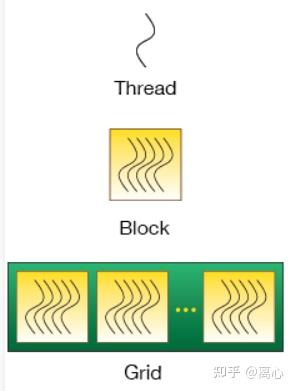
grid_sizeandblock_size: both can bedim3structural, or aunsignedint variable. In CUDA, thread is the basic unit, thread block is composed by thread, then grid is composed by block. - SIMD: single instruction multiple data. This is the logic of kernel launch. When launch, each thread will execute the code in kernel function.
When the grid_size and block_size are both unsigned int, this is the simplest case
When grid_size and block_size are dim3 , it can be
dim3 grid_size(2, 3);    // 定义为二维变量
dim3 grid_size(2, 2, 2); // 定义为三维变量
For 2D case,
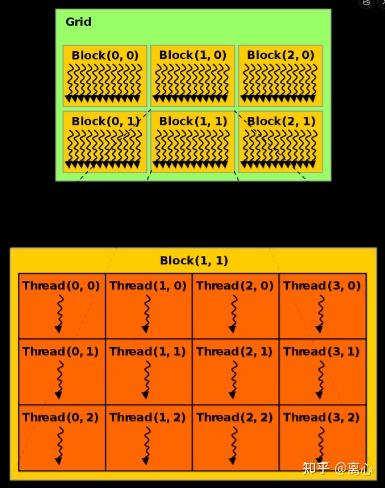
For 3D case:
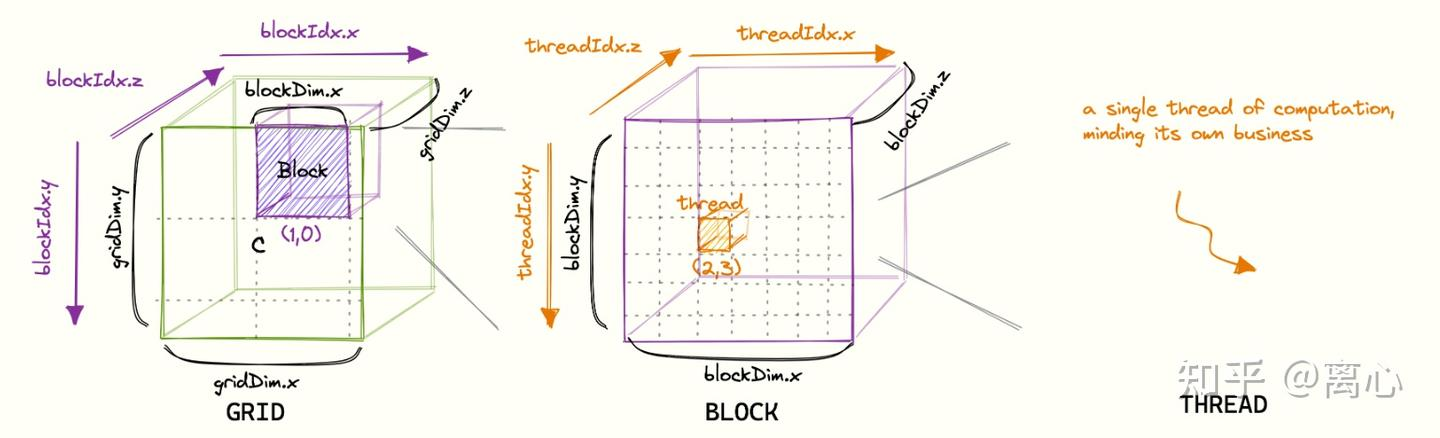
It is clear that to calculate the number of thread in a kernel can be done with num_threads = grid_size.x * grid_size.y * grid_size.z * block_size.x * block_size.y * block_size.z
CUDA kernel design
The common paradigm is
__global__ void kernel_function(const float* data1, const float* data2,
                                float* result, /* maybe sizes */) {
    const int idx = blockIdx.x * blockDim.x + threadIdx.x;
    if (idx >= N) return;
    result[idx] = some_operation(data1[idx], data2[idx]);  // example
}
data1, data2 are pointers to the data needs to be processed, index1, index2 are used to locate the index of the data needs to be computed, then do some operations, then write back to the result pointer which is used to save the final result. The kernel are almost always void.
For example
void __global__ add(const double *x, const double *y, double *z, const int N) {
    const int n = blockDim.x * blockIdx.x + threadIdx.x;
    if (n < N) {
        z[n] = x[n] + y[n];
    }
}
In this code, the code snippet that sync thread and data is const int n = blockDim.x * blockIdx.x + threadIdx.x; , and the add operation is done afterwards.
In both blockIdx and threadIdx , x is the fastest moving one, then y .
Full code can be seen as
#include <math.h>#include <stdio.h>
const double EPSILON = 1.0e-15;
const double a = 1.23;
const double b = 2.34;
const double c = 3.57;
void __global__ add(const double *x, const double *y, double *z);
void check(const double *z, const int N);

int main(void) {
    const int N = 100000000;
    const int M = sizeof(double) * N;
    double *h_x = (double*) malloc(M);
    double *h_y = (double*) malloc(M);
    double *h_z = (double*) malloc(M);

    for (int n = 0; n < N; ++n) {
        h_x[n] = a;
        h_y[n] = b;
    }

    double *d_x, *d_y, *d_z;
    cudaMalloc((void **)&d_x, M);
    cudaMalloc((void **)&d_y, M);
    cudaMalloc((void **)&d_z, M);
    cudaMemcpy(d_x, h_x, M, cudaMemcpyHostToDevice);
    cudaMemcpy(d_y, h_y, M, cudaMemcpyHostToDevice);

    const int block_size = 128;
    const int grid_size = (N + block_size - 1) / block_size;
    add<<<grid_size, block_size>>>(d_x, d_y, d_z, N);

    cudaMemcpy(h_z, d_z, M, cudaMemcpyDeviceToHost);
    check(h_z, N);

    free(h_x);
    free(h_y);
    free(h_z);
    cudaFree(d_x);
    cudaFree(d_y);
    cudaFree(d_z);
    return 0;
}

void __global__ add(const double *x, const double *y, double *z, const int N) {
    const int n = blockDim.x * blockIdx.x + threadIdx.x;
    if (n < N) {
        z[n] = x[n] + y[n];
    }
}

void check(const double *z, const int N) {
    bool has_error = false;
    for (int n = 0; n < N; ++n) {
        if (fabs(z[n] - c) > EPSILON) {
            has_error = true;
        }
    }
    printf("%s\n", has_error ? "Has errors" : "No errors");
CUDA compiler
official compiler is nvcc .
- nvcc first divide all source code as host and device code
- host code fully support C++
- device only partially support C++
- nvcc first compile device code as PTX (parallel thread execution)
- then PTX to binary cubin
2. Keys in CUDA acceleration
First the bandwidth between GPU core and device memory is much higher than the one between GPU and CPU, so using cudaMemcpy to copy data from CPU to GPU is very time consuming.
Hence, in order to have better GPU acceleration, we need to reduce the time for data transferring/communication. If the GPU core is compute-heavy, then the transferring time can be negligible.
Arithmetic intensity of a task is the ratio between the workload of the arithmetic operation and the workload of necessary memory operation. Both in terms of time. Obviously, if a task has higher arithmetic intensity, it will have better acceleration.
To increase arithmetic intensity is the same as to decrease the workload of memory operation:
- try less memory operation amap
- increase memory operation correctly using CUDA memory structure like shared memory, registry memory.
Resident threads per SM and parallel scale
SM stands for stream multiprocessor. A GPU contains a large number of SMs.
SM in details
SM is physical hardware structure, real compute cluster on the GPU (with schedulers, register files, execution units, and related resources). A GPU contains many SMs (A100 has 108 SMs).
The logic layer of CUDA is Thread < Block < Grid
- Thread: minimal execution unit
- Block: maximal 1024 threads, inside one block, it can
__syncthreads(), use shared memory - Grid: all the blocks in this launch; different blocks has no default sync (can be done using global mem, etc)
The relation between SM and thread, block, grid
- Thread: on hardware, they are grouped as WARP (32 lanes); WARP is the real unit on SM
- Block: the whole block is tied on a SM for execution; same block WILL NOT be divided onto 2 SMs; One SM can host multiple blocks.
- Grid: many blocks are allocated to SMs by the hardware; usually not decided by the code sth like ‘block 0 go to SM 3’.
In other words,
- layer including: Grid>Block>Thread
- on hardware:
Block →(allocated)→ SM;Thread →(grouped into)→ Warp →(scheduled by SM)
Scale of parallelism is closely related to the number of simultaneously resident threads in a GPU. In order to make the performance of a cuda program reach optimal, it needs to increase the number of simultaneously resident threads in each SM.
We can determine scale of parallelism by declare gridDim and blockDim when we call kernel function.
The relations can be understood as the following:
- the scale of parallelism is, from the perspective of the whole GPU, about the number of resident threads
- resident threads in SM is from micro perspective.
Two factors affect the number of resident threads in SM:
- scale of parallelism. When scale of parallelism is not big enough, the number of threads allocated to each SM is too small. Then it is far from the theoretic upper bound of the number of thread in each SM. This is called low occupancy of SM. GPU is under usage.
- Resource limits. Every SM has a number of registries, shared memory, etc. When the kernel function use the resources above certain threshold (single thread usage violet upper bound), SM will have to reduce the number of resident threads in it.
3. CUDA memory architecture
Overview
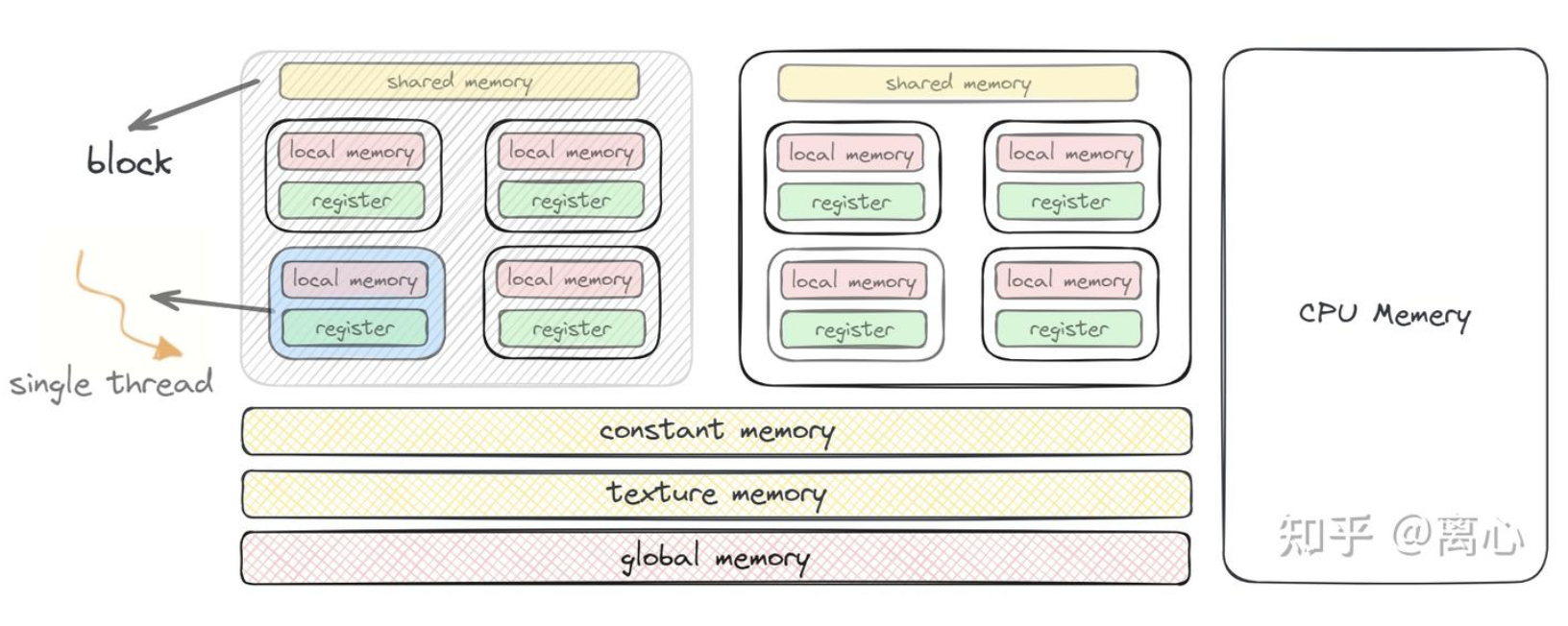
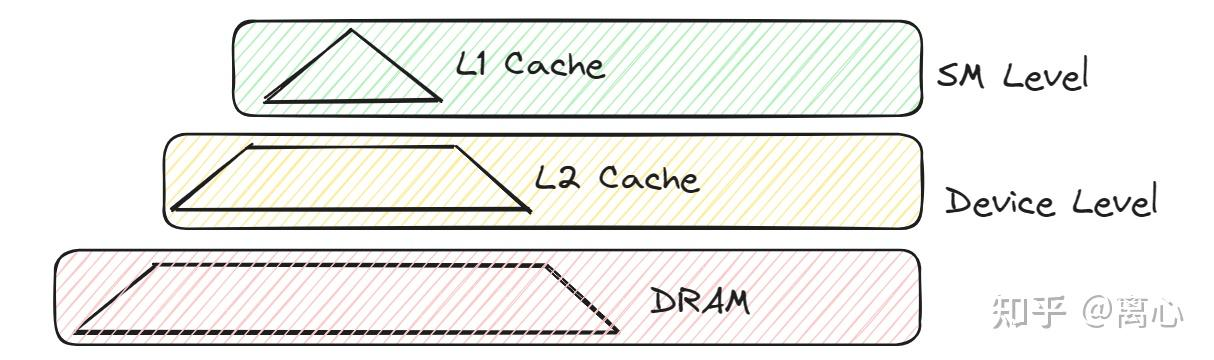
Same as CPU, GPU has multi-layer memory. Different layer has different access speed and capacity. In the picture above, it is shown the visibility range and the corresponding access speed (from fast to slow, green, yellow, red).
| Memory Type | Visibility / Scope | Physical Location | Access Speed | Lifetime |
|---|---|---|---|---|
| Global memory | Visible to all threads and the host | Off-chip | Slow | Allocated and freed by the host |
| Local memory | Visible to a single thread | Off-chip | Slow | Lifetime of the owning thread |
| Shared memory | Visible within a thread block | On-chip | Medium | Lifetime of the owning thread block |
| Constant memory | Visible to all threads and the host | Off-chip | Medium | Allocated and freed by the host |
| Texture memory | Visible to all threads and the host | Off-chip | Medium | Allocated and freed by the host |
| Register memory | Visible to a single thread | On-chip | Fast | Lifetime of the owning thread |
Note here less visibility memory does NOT mean faster access speed, for example local memory and registry memory are both only visible to thread, but very different access speed.
Dynamic global memory
Global memory can be visited by all the thread in kernel functions.
Dynamic global memory are specifically meant memory allocated by cudaMalloc
Global mem capacity is the largest in the device, almost equal to the VRAM.
Any thread can visit any location in global memory.
For example
void __global__ add(const double *x, const double *y, double *z, const int N)) {
    const int n = blockDim.x * blockIdx.x + threadIdx.x;
    if (n < N) {
    z[n] = x[n] + y[n];
    }
}
Here d_x, d_y, d_z are in global memory, and we let the n-th thread to visit n-th position of these vectors (but essentially can be any position).
Static global memory
Dynamic global memory is allocated by cudaMalloc . Its size is decided at the runtime. CUDA also provides static global memory, its size is decided at compiling time.
Static global variables must be defined outside of all the host and device functions, and decorated by __device__, for example
__device__ float x;
__device__ float y[N];
Kernel function can visit static global variables directly, in the same way as dynamic global variables. But host function can NOT visit static global variable directly. It must via cudaMemcpyFromSymbol and cudaMemcpyToSymbol for read/write.
cudaError_t cudaMemcpyFromSymbol(
    const void* symbol, // 静态全局内存变量名
    const void* src,    // 主机内存缓冲区指针
    size_t count,   // 复制的字节数
    size_t offset = 0,  // 从 symbol 对应设备地址开始偏移的字节数
    cudaMemcpyKind kind = cudaMemcpyHostToDevice // 可选参数
);

cudaError_t cudaMemcpyToSymbol(
    const void* dst,    // 主机内存缓冲区指针
    const void* symbol, // 静态全局内存变量名
    size_t count,   // 复制的字节数
    size_t offset = 0,  // 从 symbol 对应设备地址开始偏移的字节数
    cudaMemcpyKind kind = cudaMemcpyHostToDevice // 可选参数
);
Constant memory
Constant memory are the global memory with constant cache. Even though it is a type of global memory, physically outside the chips, its access speed is higher than global mem due to constant cache.
- Outside of kernel function, we can use
__constant__to define variables allocated to constant memory, and then usecudaMemcpyToSymbolto assign values. - the
constinput variables to kernel functions will also be allocated on constant memory. For exampleconst int Nin the example above.
One trick is to warp constant array as a struct, and then input the constant struct as const to kernel function. Then constant memory will be used.
Texture memory (cache)
Similar to constant memory, texture memory is a type of global memory with cache. But it is bigger.
For devices with computing capacity no less than 3.5, we can use __ldg() function to load some read-only global memory to read-only data cache.
Registry memory
Visible to single thread, fastest memory. High-frequent visit variables should be put in registry memory. For example, gridDim, blockDim, blockIdx, threadIdx .
Generally, a single thread can use up to 255 registries (every registry can store 4 bytes data), a block can use up to 64k (65536) registries. Hence, in the definition of kernel function, we need to aware of the following case: when the data is too large, overflowed part will be allocated to local memory by the compiler, and access speed of local memory is much slower than registry memory.
Local memory
The variables in a kernel function without any qualifier may reside either in register memory or in local memory. Variables that cannot fit in registers are allocated by the compiler to local memory. Even though variables in local memory are only visible to the single thread, but since local memory is a part of global memory, it has the same latency as the global memory. Hence more usage of local memory will affect the performance.
Shared memory
Shared memory are second fastest comparing to the registry memory. It also has limited number and visibility. Shared memory is only visible to block, i.e., all the thread in one block can visit the shared memory of this block, but can not visit the shared memory of others.
Shared memory can be classified as static shared memory and dynamic ones. For variables in shared memory, they usually use prefix s_
Dynamic shared memory can make the program easier to maintain.
-
To use static shared memory, just use
__shared__in the def of kernel function__shared__ float s_data [128]; // 128-dim float array for a block -
To use dynamic shared memory, two steps are needed
- first, call the kernel with the third variable in
<<<>>>which represents the number of bytes in the dynamic shared memory used by each thread block -
then, in the kernel function, use
externto declare dynamic shared memory as array, and without declaring the size of the array__global void kernel_function(parameters) { extern __shared__ float ds_data []; ...... }
Using shared memory to optimize visit/save in memory is an important GPU optimization strategy.
- first, call the kernel with the third variable in
L1 L2 cache of global memory and local memory
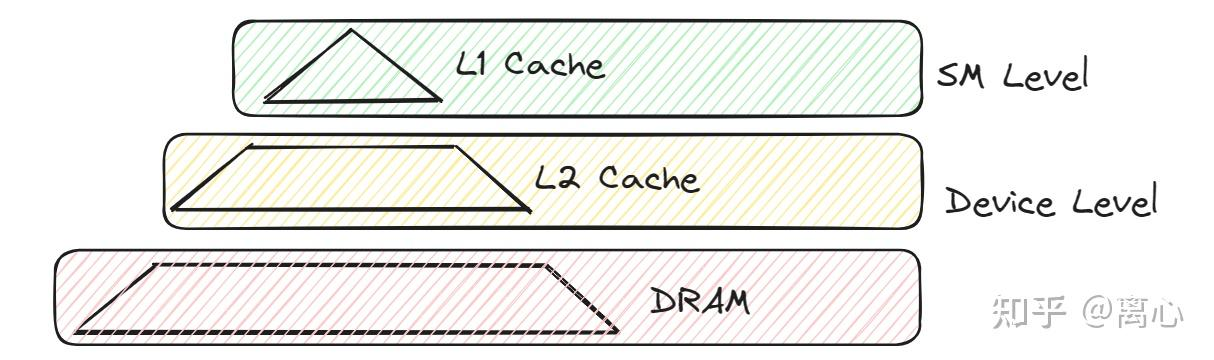
To reduce the access latency of global memory and local memory (which physically reside in the same memory region), CUDA also adds an SM-level L1 cache and a device-level L2 cache for this memory space.
L1 and L2 cache are used to speed up accesses to global and local memory. A thread access global/local memory, it will first check L1 cache inside of SM, if not exist, it will check L2 cache in device, if not exist, then DRAM.
L1 cache physically exists inside SM (L1 cache and shared memory exist on the same SRAM in SM), so L1 has better access efficiency. L2 cache is worse.
L1/L2 cache are different from shared memory, shared memory is programmable memory, i.e., CUDA engineer can decide which data to put into shared memory to accelerate. But L1/L2 cache are less flexible, it is up to the GPU internal algorithm to decide what data will be put on this part of memory. In general, recently frequent used data will be put on the cache.
Because each SM usually has its own L1 cache, a thread block scheduled on an SM will use that SM’s L1 cache when accessing global memory. Therefore, if threads in the same block access nearby global memory addresses, the L1 cache can be used more effectively.
The L2 cache, on the other hand, is shared by the whole GPU. Blocks running on different SMs may all benefit from L2 if they access the same or nearby global memory locations.
Unlike shared memory, L1 and L2 caches are managed automatically by hardware. Programmers cannot directly decide what data is placed in them, but they can improve cache hit rates by making memory accesses continuous, nearby, and reusable.
For example:
int idx = blockIdx.x * blockDim.x + threadIdx.x; float x = input[idx];
This is a good access pattern because neighboring threads access neighboring addresses.
In contrast:
int idx = threadIdx.x * stride + blockIdx.x; float x = input[idx];
If stride is large, neighboring threads access far-apart addresses, so cache efficiency becomes poor.
4. Optimization strategies for reducing SM resource bottlenecks
Revisit the architecture of GPU
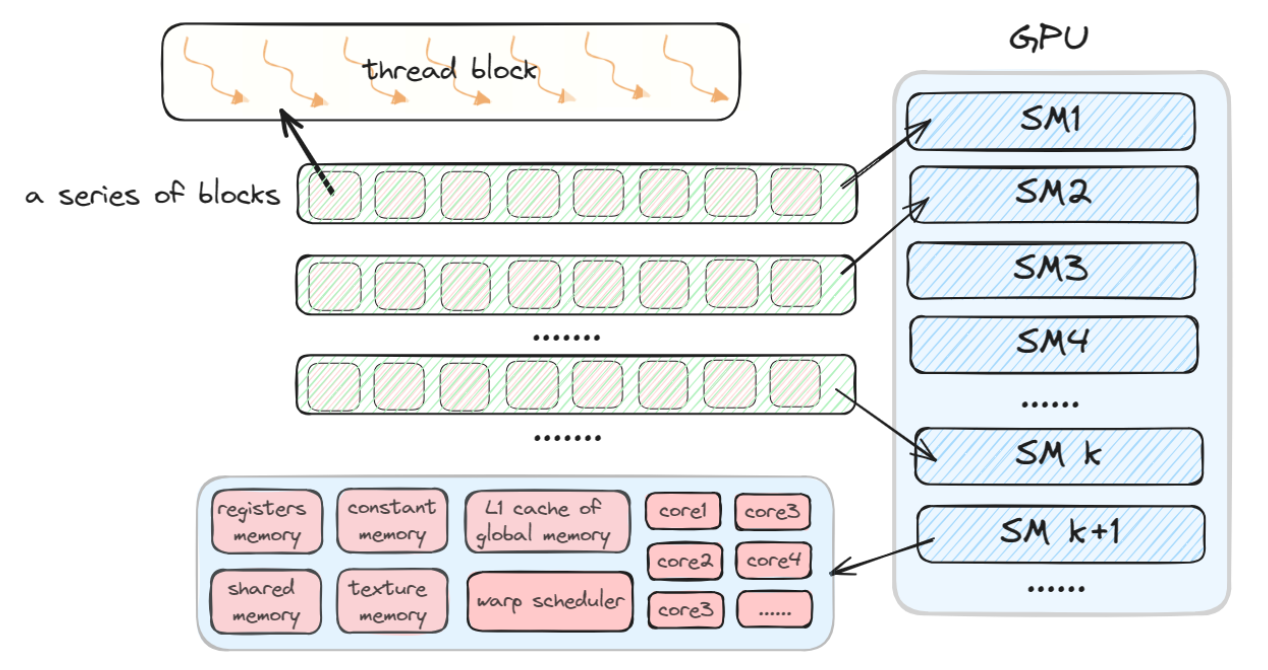
The actual building block of the GPU’s compute units is the SM, or Stream Multiprocessor. The relationship among the GPU, SMs, and thread blocks is shown in the figure below.
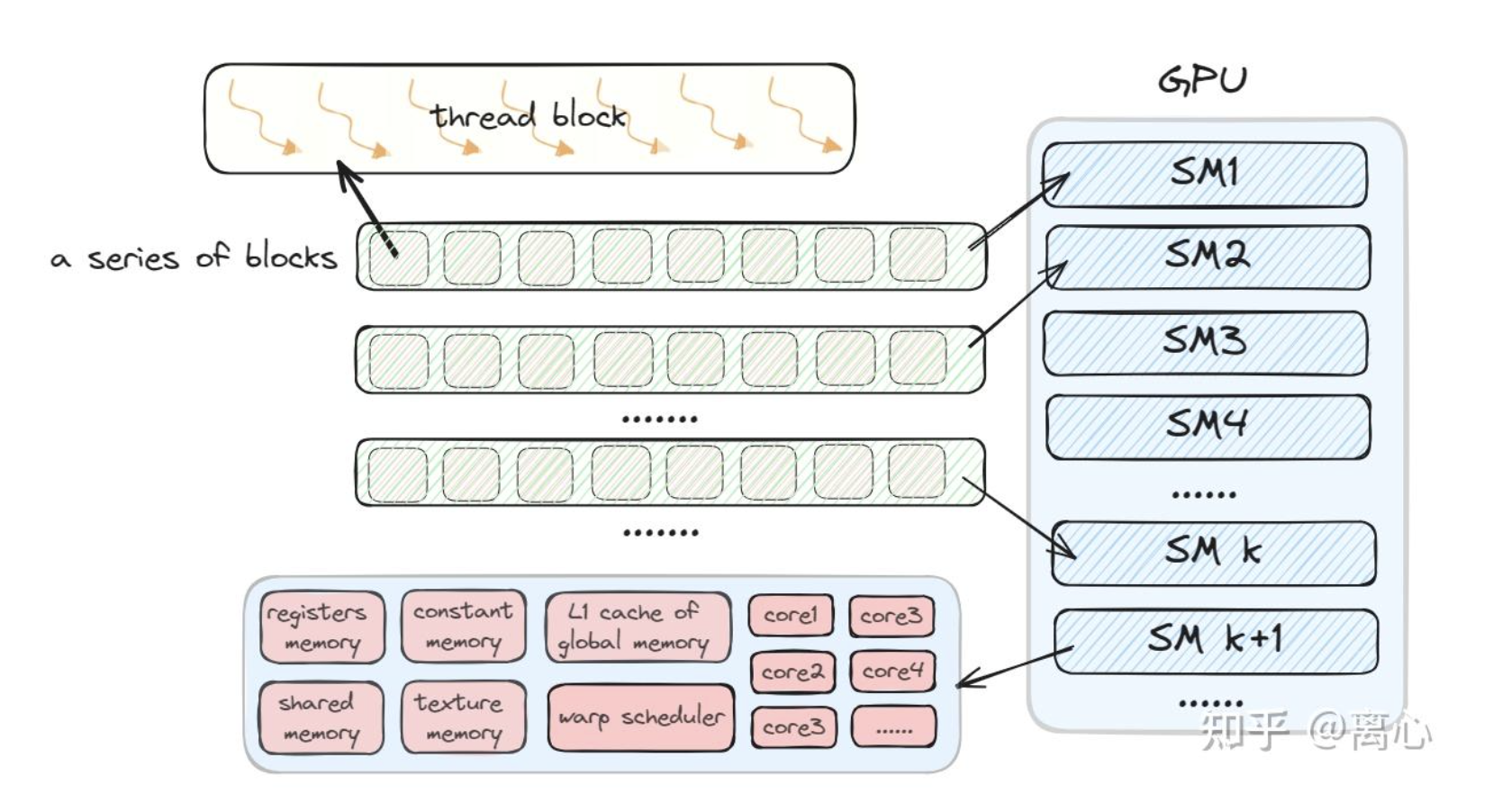
- one GPU has many SM
- during execution of kernel function, one SM can be allocated with many thread blocks. But one thread block can only be executed by one SM.
- one SM can be allocated with 16 or 32 thread blocks at most (depends on the architecture), and with 1024 or 2048 threads at most
- during SM execution, it is usually use Warp as unit to produce, manage, schedule and execute threads.
- one warp has 32 threads
- SM includes the following components
- some registry memory
- some shared memory
- some constant memory
- some textual memory(cache)
- L1 cache of some global and local memory
- some wary schedulers
- some execution cores
Optimizing SM Occupancy
As mentioned before, (for certain architecture) one SM can at most host 2048 threads, and at most host 16 thread blocks. When a SM executes 2048 threads, we say this SM occupancy is 100%. This requires not only enough parallelism, but also careful control over the resources used by each thread. This is because the register memory and shared memory capacity of each SM are limited.
For registry memory
Suppose we want an SM to be fully occupied with 2048 resident threads. Considering that the maximum register capacity available on an SM is 64 K, each thread can use at most 32 registers. If one thread uses 64 registers, this does not exceed the architectural maximum per thread, which is usually 255, as discussed in the register memory section, so it will not spill into local memory. However, the number of threads that can reside on the SM will drop to 1024. In this case, the occupancy becomes 50%.
- the calculation
- SM has 64k 32-bit registers, which means 65536 registers, not 64KB memory
- 1 register = 32 bit = 4 bytes
- 65536 registers * 4 bytes = 262144 bytes = 256 KB
- This means, if an architecture support 64k 32-bit-register per SM, then each SM register capacity is 256KB
- Occupancy is counted by the number of registers, NOT by byte
- If we want to have occupancy = 100%, then each thread on average can at most use 65536/2048 = 32 registers/thread, and 32 registers = 32 * 4 bytes = 128 bytes
- One thread can use more registers (up to 255), but this will decrease the number of hosted thread in SM.
- For example, if a thread use 64 registers, 65536/64=1024, and occupancy becomes 50%
For shared memory
Since shared memory is shared by thread blocks, suppose the kernel function assigns the size of thread block as 128 (128 threads per block), this SM has to simultaneously process 16 blocks to achieve full occupancy with 2048 threads. Take V100 as an example, shared memory is 96KB, then each block should use less than 6KB shared memory to achieve 100% occupancy.
NOTE: if the shared memory used by thread block surpass the upper limit of the SM, this kernel function will not be able to execute.
BASIC Principle: the fewer registers a kernel uses, the more threads and thread blocks are likely to reside on a multiprocessor, which can improve performance.
SM runtime parameter query and control
- query: use the compiler option
--ptxas-options=-vto query the usage of registers by each kernel function -
use decor
__launch_bounds__: this one can assign max number of threads by each block, and minimal number of blocks per SM#define MAX_THREADS_PER_BLOCK 256 #define MIN_BLOCKS_PER_SM 2 __global void launch_bounds(MAX_THREADS_PER_BLOCK, MIN_BLOCKS_PER_SM) fooKernel(int inArr, int outArr) { // ... Computation of kernel } - use
--maxrregcountcompiler option to assign the number of registers can be used by each thread. The part above will be allocated to local memory, hence this option can have negative impact: SM occupancy can be higher by this option, but the high latency due to local memory is not optimal either.
5. Acceleration strategy 1: based on global memory coalescing (全局内存合并访问)
The discuss here based on 3 basic facts (the first two are about when cuda visit global mem, how hardware combine a group of threads’ IO into fewer memory events):
- A warp’s global memory access is served in units of 32-byte memory transactions.
-
explanation
When a thread within a warp visit global memory, hardware will organize these visit as 32-byte memory sector. For example, we have a warp with 32 threads, each thread reads one
floatfloat x = a[threadIdx.x];Every float is 4 bytes, 32 threads needs in total: 32*4 = 128 bytes. But global memory is not serving as each thread take 4 bytes separately, rather as multiple aligned 32-byte sector: 128 bytes = 4 * 32 bytes.
Hence if these 32 threads visit consecutive address, and well aligned, then it can be grouped as fewer memory events, e.g., 4 32-byte sector.
For example, if the tread visit are continuous and aligned
  thread 0 visit a[0]
  thread 1 visit a[1]
  thread 2 visit a[2]
  ...
  thread 31 visit a[31]
Then address distribution is also continuous:
  a[0]  ~ a[7]   = 32 bytes
  a[8]  ~ a[15]  = 32 bytes
  a[16] ~ a[23]  = 32 bytes
  a[24] ~ a[31]  = 32 bytes
so hardware need only to trigger 4 32-byte memory transactions, which will be used by all the treads as 100%.
On the other hand, if the visit are scattered, e.g.,
float x = a[threadIdx.x * 8];Since 8 floats = 32 bytes, the neighboring threads are falling into different 32-byte segments
  thread 0  -> a[0]
  thread 1  -> a[8]
  thread 2  -> a[16]
  ...
  thread 31 -> a[248]
Now every thread will have to use a separate 32-byte transaction
32 个 transactions * 32 bytes = 1024 bytesBut the real useful data is still 32 thread * 4 byte = 128 bytes. The utilization is only 12.5%.
-
- The starting address of memory allocated with
cudaMallocis an integer multiple of 256 bytes.-
explanation
cudaMallocreturned global memory address is 256-byte aligned. For example it can return 0x1000, 0x2000, 0x3000 (16进制, hex digit, 4096, 8192, 12288); but will not return address like 0x1004. This is important because 256 is a multiple of both 32 and 128, therefore the beginning of an array allocated bycudaMallocis naturally suitable for coalesced access.For example, the starting address of
float* ais 256-byte aligned, then warp read:int idx = blockIdx.x * blockDim.x + threadIdx.x; float x = a[idx];if
blockDim.xis multiple of 32, then every warp usually start to read consecutive 32 float from an aligned address, and form a 4 32-byte transactions perfectly.If the address is not aligned, for example
  thread 0  -> a[1]
  thread 1  -> a[2]
  ...
  thread 31 -> a[32]
even though it is consecutive, but the address scope span 5 32-byte segment. So it needs 5 transactions, not 4.
cudaMalloc’s 256-byte alignment only provides a good starting point, the program still needs to let the tread visit consecutive address, and try to let block size be multiple of warp size, to utilize coalescing efficiently.
-
- Global memory access patterns after cache is introduced are discussed below.
Global memory access pattern with cache
As mentioned above, because global memory has high access latency, CUDA introduces an SM-level L1 cache and a device level L2 cache to reduce this latency. With this setup, the access pattern is as follows:
A thread first accesses the L1 cache on the SM where it is running. If the data is found, the data is returned directly.
If the required data is not in the L1 cache, that is, an ‘L1 cache miss’ occur, the thread then accesses the device-level L2 cache. If the required data is found, the data is returned directly.
If the required data is not in the L2 cache either, meaning both an ‘L1 cache miss’ and an ‘L2 cache miss’ occur, the thread accesses DRAM to fetch the data. This case has the highest access latency.
Access Advantages Brought by Data Locality
We take the following example (array doubling)
__global__ void double_array(float* data_in, float* data_out) {
     unsigned int tid = blockDim.x * blockIdx.x + threadIdx.x;
     data_out[tid] = data_in[tid] * 2;
}
Assume that the starting address of data_in is allocated at address 0, blockDim.x is 64, and wrap size is 32. Also assume that the L1 cache is empty at the beginning, and that thread 0 executes first. Here, we use tid to number the threads.
Here float* data_in, float* data_out are two pointers. The pointer itself are possible stored in the register, but the value it points to is usually in global memory, which is allocated by cudaMalloc . For example
float* data_in;
cudaMalloc(&data_in, N * sizeof(float));
When thread 0 accesses the first element of data_in, a cache miss occurs. In this example, we only consider the L1 cache. However, for the 7 neighboring threads of thread 0, when they access their corresponding data, the data has already been loaded into the L1 cache, so they will not cause cache misses.
Therefore, during the execution of one warp, only 4 cache misses occur. Clearly, these 4 cache misses are already the minimum necessary number of cache misses. We call this kind of access coalesced access.
After this process, the whole data sector is loaded to cache, then each thread will bring the float it needs to its own register.
We can define the coalescing ratio as:
coalesce = data_size / load_size * 100%
where data_size is the number of bytes that actually need to be read, and load_size is the number of bytes loaded from DRAM into the L1 cache. In the above case:
coalesce = 32 / 32 * 100% = 100%
Examples of non-coalesced access are common. Consider matrix multiplication A*B = C
We read matrix A by rows and matrix B by columns. Suppose each row of matrix B has enough elements, so that the address distance between elements in adjacent rows is greater than 32 bytes. Then reading a column of matrix B must be a non-coalesced access pattern, and the coalescing ratio will be very low, because accessing each element may trigger a cache miss.
6. Acceleration based on shared memory
In the previous sections, we discussed how to declare shared memory in a kernel function, including static and dynamic shared memory. Here we will discuss the use case of shared memory.
Above, we discussed the example of matrices multiplication, we have a ‘disappointing’ conclusion: if A has coalesced access pattern, B must have non-coalesced one. That is how shared memory can help.
Suppose the shared memory is unlimited, we can put the whole matrix B in it, then for access the rows of A can be accelerated by L1 cache, and for columns of B it can be accelerated by shared memory.
However, shared memory is not unlimited, matrix B can not be fitted in as whole. It is usually to use matrix partition, let each thread block take charge of computation task of a small block.
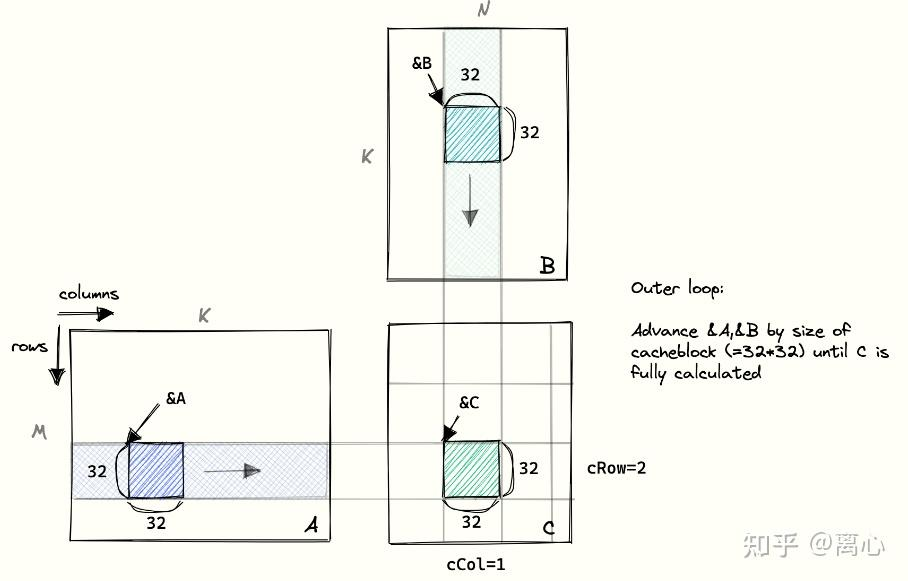
The general guidance here is: for those access that have to be non-coalesced, we can first load them in the shared memory, then do the computation. This can be concluded as the following paradigm:
__global__ void kernel_function(parameters) {
     // Suppose due to alg, the access to data is non-coalesced
     // 1. define shared memory
     __shared__ float s_data [data_size];
     // 2. copy data to shared mem
     s_data[copy_index] = data[copy_index];
     // 3. wait all the thread in this block to finish copy operation
     __syncthreads();
     // 4. operation (include non-coalesced ones)
     operations(data);
}
Avoiding Shared Memory Bank Conflicts
Before we introduce bank conflicts, we need to discuss the physical structure of GPU shared memory.
In order to support parallel data reads, some memory structures need to provide multi-port read capability. However, a true multi-port read/write structure consumes a large amount of wiring resources.
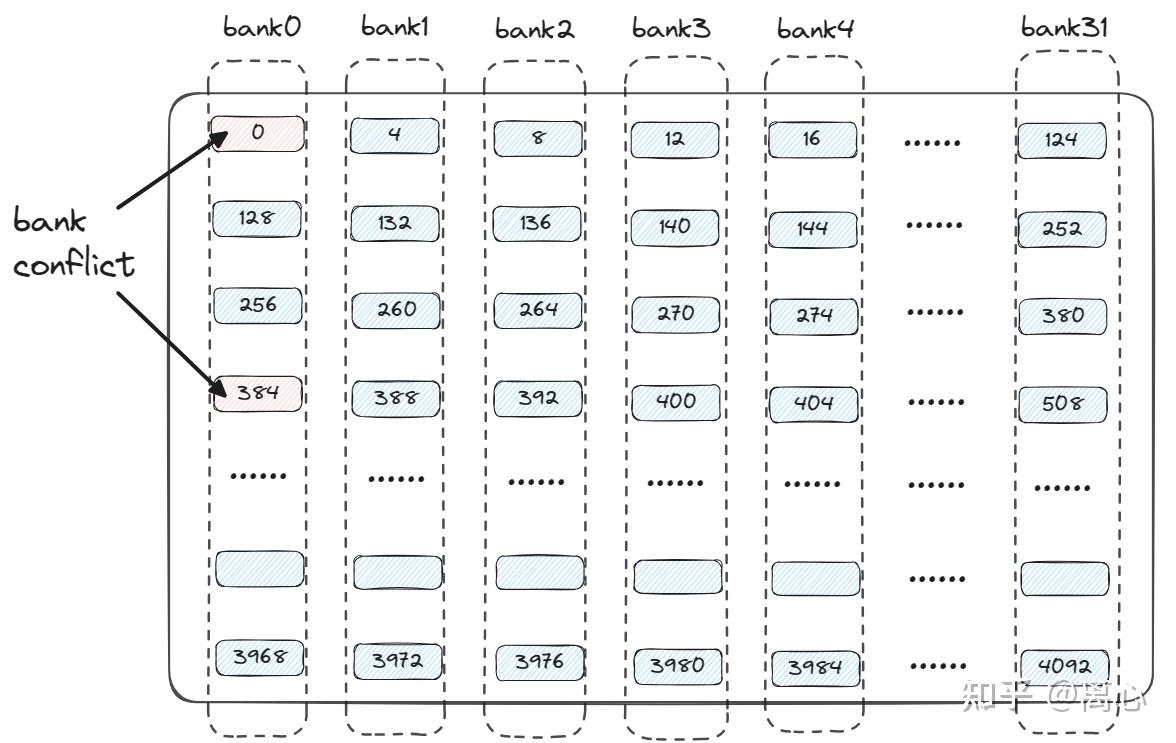
Assume that, the shared memory structure is as shown in the above image: the shared memory available to one warp is 4 KB (4096).
Imagine that we need to support all 32 threads in a warp accessing shared memory. In that case, one straightforward but expansive way is that we would need 32 access port (each thread have its own port, and each port can visit the whole shared memory). Since the shared memory is 4KB and aligned by 4 bytes, each port would need to be able to index 1024 locations, which means this port needs 10 bit address (1024 = 2^10). Then for 32 port, the total address index is 320 bits. This is expensive.
So GPU are designed as the follows:
- divide shared memory as 32 bank
- each bank has its own port
- each bank only takes charge of partial addresses (as in the picture above).
In this case, each port need 5-bits (32) address index, and 160-bits in total.
If 32 threads visit 32 different banks, shared memory can serve in parallel; if multiple thread visit the same bank, it can only be queued or batched. This is bank conflict. In reality, this can be remedy by optimize code.
7. Atomic functions
We start with review ‘race condition’: multiple threads are accessing the same memory location at the same time, and at least one of them performs a write. As a result, the final outcome may depend on the execution order.
Commonly seen cases are:
-
read-write conflict: one thread read, the other thread write to the same address
 // thread A
 x = data[0];

 // thread B
 data[0] = 10;
Now the result depends on the order, not determined
-
write-write conflict: multiple threads write to the same address
 // thread A
 data[0] = 1;

 // thread B
 data[0] = 2;
the same, non-determined.
-
read-modify-write conflict: this is the case usually resolved by the atomic function.
For example, multiple thread execute
counter = counter + 1;it is one line, but with 3 steps: first read
counter, then add 1, then writecounter. If two threads execute at the same time:counter init = 0 thread A read 0 thread B read 0 thread A write 1 thread B write 1the result becomes 1, but the correct result should be 2. If we use atomic add, it can guarantee each thread’s add will not be interrupted:
atomicAdd(&counter, 1); -
ordering/visibility issue
Sometime one thread write data, it possibly need sync mechanism to control when the other thread can view the data. For example, for the threads within a block,
__syncthreads();can guarantee every one write to the shared memory first, then read.
The purpose of an atomic function is to perform an indivisible read-modify-write operation on data at a certain memory location. The usage of these atomic functions is shown below. The pattern is: atomically read old value, calculate new value, write new value, but return the old value.
// Atomic addition
T atomicAdd(T *addr, T val);
// Conceptually:
T old = *addr;
*addr = old + val;
return old;

// Atomic subtraction
T atomicSub(T *addr, T val);
// Conceptually:
T old = *addr;
*addr = old - val;
return old;

// Atomic exchange
T atomicExch(T *addr, T val);
// Conceptually:
T old = *addr;
*addr = val;
return old;

// Atomic minimum
T atomicMin(T *addr, T val);
// Conceptually:
T old = *addr;
*addr = old < val ? old : val;
return old;

// Atomic maximum
T atomicMax(T *addr, T val);
// Conceptually:
T old = *addr;
*addr = old > val ? old : val;
return old;

// Atomic increment
unsigned int atomicInc(unsigned int *addr, unsigned int val);
// Conceptually:
unsigned int old = *addr;
*addr = old >= val ? 0 : old + 1;
return old;

// Atomic decrement
unsigned int atomicDec(unsigned int *addr, unsigned int val);
// Conceptually:
unsigned int old = *addr;
*addr = (old == 0 || old > val) ? val : old - 1;
return old;

// Atomic compare-and-swap
T atomicCAS(T *addr, T compare, T val);
// Conceptually:
T old = *addr;
if (old == compare) {
    *addr = val;
}
return old;

// Atomic bitwise AND
T atomicAnd(T *addr, T val);
// Conceptually:
T old = *addr;
*addr = old & val;
return old;

// Atomic bitwise OR
T atomicOr(T *addr, T val);
// Conceptually:
T old = *addr;
*addr = old | val;
return old;

// Atomic bitwise XOR
T atomicXor(T *addr, T val);
// Conceptually:
T old = *addr;
*addr = old ^ val;
return old;
Note:
- atomic function can only guarantee the operation on a specific address is atomic, it does NOT guarantee all the thread are synced.
- the functions above are all device functions, meaning they can only be used inside kernel functions.
- Also, like other parallel programming tools, CUDA atomic functions inevitably hurt performance, so they should only be used when necessary
8. CUDA Warps
Thread divergence caused by SIMT
SIMT (single instruction, multiple threads), refers to an execution model in which, at any given moment, the threads within the same warp can only execute one common instruction, or remain idle.
When a kernel contains a conditional branch, suppose the branch has two paths:
if (condition) A else B
A warp actually needs two execution passes to complete this:
- the threads that satisfy the condition execute branch A, while the other threads remain idle.
- the threads that do not satisfy the condition execute branch B, while the other threads remain idle.
The SIMT behavior applies at the warp level. In other words, we do not need all threads in the whole system, or even all threads in a thread block, to follow the same branch. We only need to make the threads within the same warp follow the same branch as much as possible.
To determine whether threads belong to the same warp, we only need to look at their tid. Threads with the same value of: tid/32 are assigned to the same warp and executed by the same SM. Since the warp size is 32, we usually set the thread block size to a multiple of 32, so that the block can be divided neatly into several warps.
Warp Synchronization Function
Above, we have already used the thread synchronization function __syncthreads() . This function blocks all threads that have reached that point until all threads in the block have reached the same point, and then releases them.
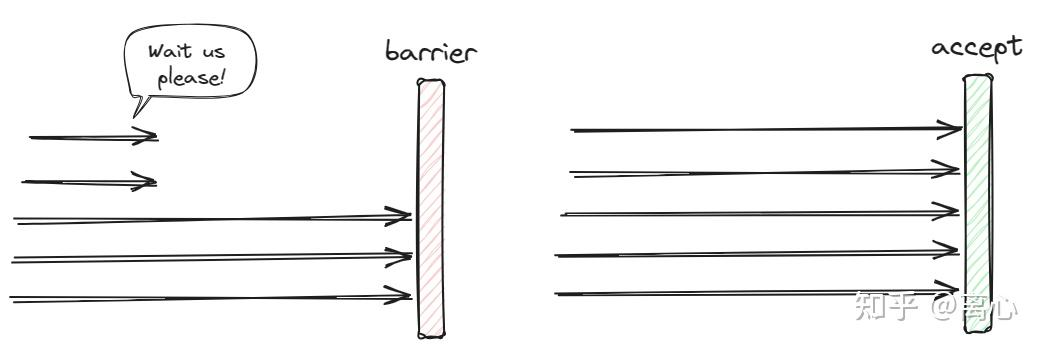
Another commonly used warp synchronization function is __syncwarp(). The difference between __syncwarp() and __syncthreads() is:
-
__syncthreads()has a broader synchronization scope: it waits for all threads within the same thread block. -
__syncwarp()has a narrower synchronization scope: it waits only for threads within the same warp, without waiting for threads in other warps.
The __syncwarp() function also has an unsigned int mask parameter, whose default value is 0xFFFFFFFF. This parameter acts like a bitmap: threads whose corresponding binary bit is 1 participate in the synchronization. Using this mask allows more fine-grained synchronization.
Example of fine-grained sync
Here the mask can be understood as: to specify which lanes in the warp are participating this sync.
One warp has 32 threads, which is also referred as 32 lanes. mask is a 32-bit integer, each bit corresponds to one lane
bit 0  -> lane 0
bit 1  -> lane 1
bit 2  -> lane 2
...
bit 31 -> lane 31
If one position is 1, the corresponding lane will participate the sync, if 0, then it will not.
For example, the default is __syncwarp(0xFFFFFFFF); where 0xFFFFFFFF 的binary is 32 of 1: 11111111 11111111 11111111 11111111 , which means the whole warp join this sync.
If we only want to sync the first 16 threads:
int lane = threadIdx.x % 32;

if (lane < 16) {
    // only let lane 0~15 do sth
    shared[lane] = lane;

    // only sync lane 0~15
    __syncwarp(0x0000FFFF);

    int x = shared[15 - lane];
}
Here 0x0000FFFF= 00000000 00000000 11111111 11111111 .
Warp Vote functions
Warp vote functions also perform the role of warp synchronization functions in practice. In other words, in addition to providing the synchronization behavior of __syncwarp(), they can also perform a set of condition-checking operations.
-
__ballot_sync(unsigned mask, int condition): This function synchronizes the participating threads and returns the warp-lane positions of the participating threads that satisfy the specified condition.-
mask: specifies which threads in the warp participate in the synchronization and condition evaluation. -
condition: the condition to evaluate. Each thread should compute its own condition value in advance and pass it as an argument. -
return: returns a bitmap of type unsigned int. If a thread participates in the synchronization and the condition value it passes to __ballot_sync() is nonzero, then the corresponding bit in the returned bitmap is set to 1; otherwise, it is set to 0. This bitmap indicates the positions, within the warp, of all threads that satisfy the condition.
-
-
__all_sync(unsigned mask, int condition): This function synchronizes the participating threads and checks whether all participating threads satisfy the condition.-
mask: specifies which threads in the warp participate in the synchronization and condition evaluation. -
condition: the condition to evaluate. Each thread should compute its own condition value in advance and pass it as an argument. -
return: returns 0 or 1. If the condition values passed to __all_sync() by all participating threads are nonzero, it returns 1; otherwise, it returns 0.
-
-
__any_sync(unsigned mask, int condition): This function synchronizes the participating threads and checks whether at least one participating thread satisfies the condition.-
mask: specifies which threads in the warp participate in the synchronization and condition evaluation. -
condition: the condition to evaluate. Each thread should compute its own condition value in advance and pass it as an argument. -
return: returns 0 or 1. If at least one participating thread passes a nonzero condition value to __any_sync(), it returns 1; otherwise, it returns 0.
-
Warp Shuffle Functions
Warp shuffle functions also perform the role of warp synchronization functions in practice. In other words, in addition to providing the synchronization behavior of __syncwarp(), they can also share data between threads.
The following four functions are based on a similar idea: an intra-warp data broadcast mechanism. During synchronization, each thread can send the value of one of its registers, val, into the broadcast path, and other threads can receive the broadcast value.
The width parameter specifies how many threads form a group during synchronization and broadcasting. By default, this is the warp size, 32. Another parameter, srcLane, specifies which thread provides the value to be broadcast. The figure below shows how __shfl_sync() works when width = 8.
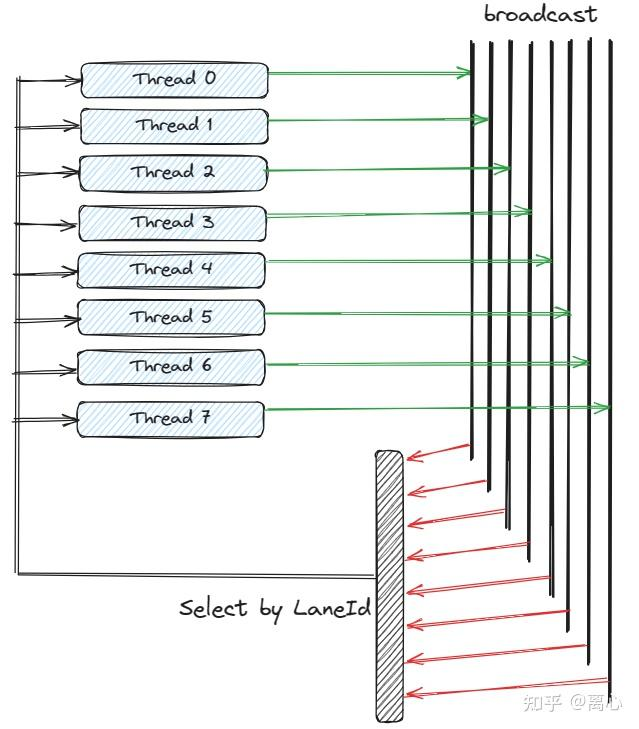
In this figure, it should be ‘select by srcLane’: here thread 0-7 put its own val to broadcast path, and each thread select the val on one of the path according to srcLane .
Intra-Warp Data Broadcast Mechanism
__shfl_sync(unsigned mask, int val, int srcLane, int width)
This function synchronizes the participating threads and shares the specified register value from a specified thread with other threads.
-
mask: specifies which threads in the warp participate in the synchronization and shuffle operation. -
val: the register value to be broadcast. -
srcLane: the lane index of the source thread that provides the register value. -
width: specifies how many threads form a group during synchronization and broadcasting.
__shfl_up_sync(unsigned mask, int val, int dist, int width)
-
mask: specifies which threads in the warp participate in the synchronization and shuffle operation. -
val: the register value to be broadcast. -
dist: if the lane index of the calling thread is tid, this function returns the val passed by the thread with lane index tid - dist. If tid < dist, it directly returns the calling thread’s own val, because tid - dist would be less than zero. -
width: specifies how many threads form a group during synchronization and broadcasting.
__shfl_down_sync(unsigned mask, int val, int dist, int width)
-
mask: specifies which threads in the warp participate in the synchronization and shuffle operation. -
val: the register value to be broadcast. -
dist: if the lane index of the calling thread is tid, this function returns the val passed by the thread with lane index tid + dist. If tid + dist >= width, it directly returns the calling thread’s own val, because tid + dist would exceed the group boundary. -
width: specifies how many threads form a group during synchronization and broadcasting.
__shfl_xor_sync(unsigned mask, int val, int laneMask, int width)
-
mask: specifies which threads in the warp participate in the synchronization and shuffle operation. -
val: the register value to be broadcast. -
laneMask: if the lane index of the calling thread is tid, this function returns the val passed by the thread with lane index tid ^ laneMask. -
width: specifies how many threads form a group during synchronization and broadcasting.
Warp shuffle functions are more suitable for lightweight data sharing within a warp. They are more efficient than directly using shared memory. However, shared memory can share data across an entire thread block and can handle a larger amount of shared data. In contrast, the maximum sharing scope of warp shuffle functions is no larger than one warp, namely warpSize = 32, and the amount of data transferred is only the size of one register.
Examples of shuffle functions
int y = __shfl_sync(0xFFFFFFFF, val, 3, 8);
Here the mask is 0xFFFFFFFF and width is 8. The function call means: all 32 lanes participate in the shuffle operation, but the shuffle is performed within groups of 8 lanes, each group use its own srclane = 3, i.e.,
lane 0~7   get value from lane 3
lane 8~15  get value from lane 11
lane 16~23 get value from lane 19
lane 24~31 get value from lane 27
Another example
int y = __shfl_sync(0x000000FF, val, 3, 8);
here mask is 0x000000FF and width is 8, this means only lanes 0~7 participate, and the shuffle group width is 8.
The basic rule: mask selects participating lanes, width defines the logical sub-warp size.
9. CUDA Asynchronous Execution
CUDA Streams
All CUDA-related operations are called CUDA operations, such as kernel launches and data transfers between the host and the device. A sequence of CUDA operations is called a CUDA stream.
If we do not explicitly specify which stream a CUDA operation should run in, the operation is assigned to the null stream, also called the default stream. All the operations discussed earlier were performed in the null stream. We can manually create our own stream:
cudaStream_t my_stream;

// Create a stream
cudaStreamCreate(&my_stream);

// Destroy the stream
cudaStreamDestroy(my_stream);
First, declare a variable of type cudaStream_t, then pass its pointer to cudaStreamCreate() to create a new stream, because this function needs to modify the value of my_stream. To destroy the stream, pass the value of my_stream to cudaStreamDestroy().
Both cudaStreamCreate() and cudaStreamDestroy() return a value of type cudaError_t, which records any errors that occur during creation or destruction. How to interpret this return value will be discussed in a later section.
CUDA also provides two functions that allow the host to flexibly query the state of a stream and decide whether to block:
cudaError_t cudaStreamSynchronize(cudaStream_t stream);
cudaError_t cudaStreamQuery(cudaStream_t stream);
The first function blocks the host until the stream specified by stream has completed execution. The second function does not block; it simply returns the execution status of the specified stream. If the stream has completed, it returns cudaSuccess; otherwise, it returns cudaErrorNotReady.
Although cudaErrorNotReady is a CUDA error code, it is not a real error in the usual sense. It is simply used to indicate that the stream has not finished executing yet.
Parallelism Between Host Code and Kernel Functions
A CUDA stream can be understood as a container for CUDA operations. CUDA operations in the same stream must follow these rules:
- Kernel launches are asynchronous. That is, when the CPU reaches the line of code that launches a kernel, it only sends a series of commands to the GPU so that the GPU can start computation. Before the GPU finishes the computation, the CPU does not block on that line. Instead, it continues executing the following host code.
- Data transfers between the host and the device based on
cudaMallocare blocking. After the host issues acudaMemcpycommand, it waits until the data transfer finishes. During this process, the host is suspended and does not continue executing the following code. - Operations in the same CUDA stream must execute strictly in order. If the previous operation has not finished, the next operation is blocked and will not start until the GPU has completed the previous operation.
In general, the operation immediately following kernel execution is usually copying the result of the kernel back to the host through cudaMemcpy. Since cudaMemcpy blocks the host and is the next operation after the kernel in the null stream, the host effectively has to wait until the kernel finishes before executing the next step.
However, because kernel launches are asynchronous, we can naturally think of the following acceleration strategy: after launching the kernel and before obtaining the result of the kernel computation, we can let the host perform another part of the computation. Finally, if the kernel execution time happens to cover the host computation time, the computation completed by the host becomes pure performance gain. The idea is shown below:
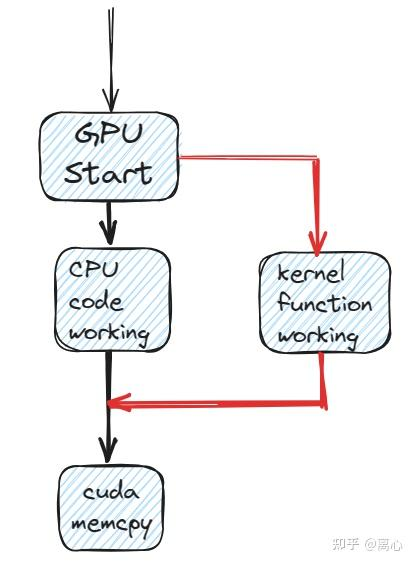
After launching the kernel and before obtaining the kernel result, the host can perform another part of the computation.
Although in some cases the CPU is not fast compared with the GPU, its larger memory capacity makes it suitable for tasks that require a large amount of memory. In fact, parallelism between the host and kernel execution is also an idea used in some top-tier conference works.
Parallel Execution of Multiple Kernels
Considering Rule 3 from the above section 9.1, two kernels in the same CUDA stream must execute serially. If we want two kernels to run at the same time, we need to place them in different CUDA streams.
We can set the fourth parameter inside the angle brackets «< »> to specify which stream a kernel should run on:
kernel_function<<<grid_size, block_size, shared_size, stream_id>>>(parameters);
Note that the parameters inside «< »> are determined by position. Therefore, if we want to specify stream_id, we must also specify shared_size. If shared memory is not needed, we still need to put 0 in the third parameter position.
Using CUDA streams to run multiple kernels concurrently has benefits. It can improve GPU hardware utilization, reduce the number of idle SMs at a given time, and improve overall system performance.
Pipeline Parallelism: Parallelism Between Data Transfer and Kernel Execution
As mentioned above, data transfer based on cudaMemcpy() blocks the host code. Therefore, before the data transfer finishes, the host cannot issue commands for the next CUDA operation. In other words, no other CUDA operation can run concurrently after a call to cudaMemcpy().
Consider the following scenario: we can combine three operations, Host-to-Device Memcpy, Kernel Launch, and Device-to-Host Memcpy, into a pipelined parallel workflow, as shown in the figure below. At any given moment, the device can execute up to three CUDA operations simultaneously, improving GPU parallelism and hardware utilization.
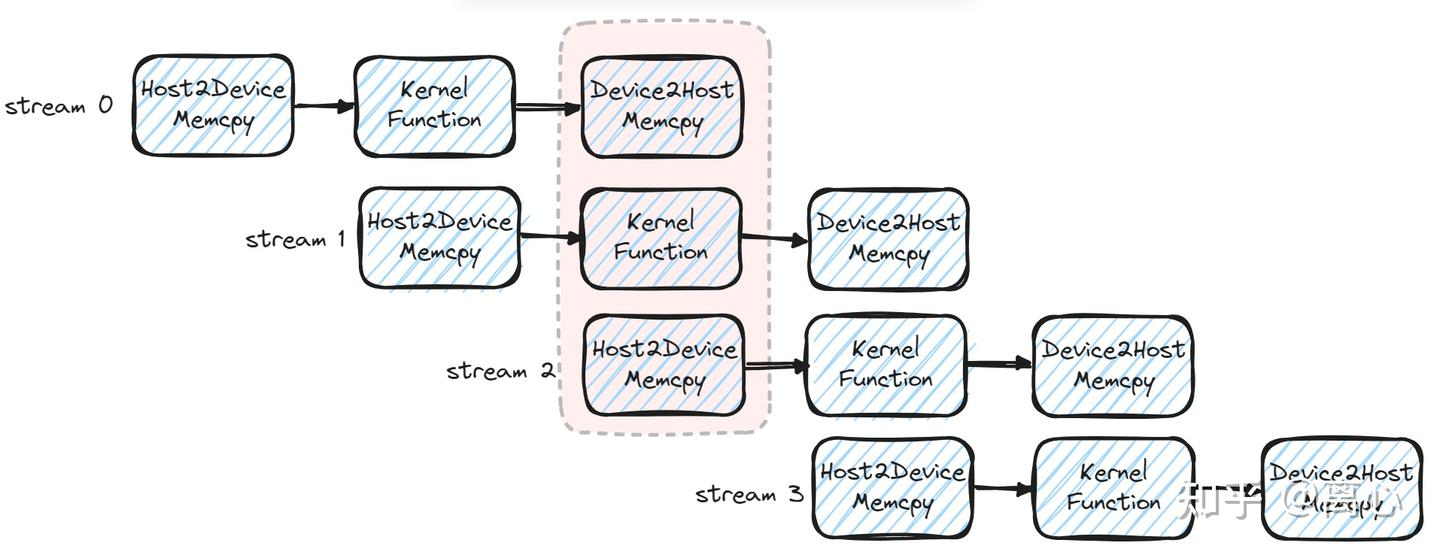
In general, we place each complete pipeline into an independent CUDA stream. To achieve this, we need the host not to be blocked during data transfer. Instead, the host should be able to immediately return and schedule other CUDA operations at the same time.
For example, in the red dashed box in the figure above, two data transfer operations and one kernel launch need to be scheduled at the same time. Clearly, none of the data transfer operations should block the host.
Therefore, we need a non-blocking data transfer function. cudaMemcpyAsync() provides this functionality:
cudaError_t cudaMemcpyAsync(
    void *dst,
    void *src,
    size_t num_bytes,
    enum cudaMemcpyKind kind,
    cudaStream_t stream
);
Its usage is almost the same as cudaMemcpy(), except that it has an additional stream parameter, which specifies the CUDA stream in which this operation will run.
One important point is that when using cudaMemcpyAsync(), we must use page-locked host memory, also called pinned host memory. Pinned host memory can be allocated with cudaMallocHost() and must be released with cudaFreeHost():
cudaError_t cudaMallocHost(void **ptr, size_t size);
cudaError_t cudaFreeHost(void* ptr);
cudaMemcpyAsync() is non-blocking, which means we can perform different data transfer tasks in different CUDA streams at the same time. This satisfies the requirement for implementing pipeline parallelism.
pipeline parallelism example
pipeline parallelism usually take this paradigm: partition the big data as chunks, and each chunk go through a small pipeline:
H2D copy -> kernel -> D2H copy
Then use multiple CUDA streams so that different stages of different chunks can overlap:
time →
stream 0: H2D chunk0 -> kernel chunk0 -> D2H chunk0
stream 1:              H2D chunk1    -> kernel chunk1 -> D2H chunk1
stream 2:                             H2D chunk2      -> kernel chunk2 -> D2H chunk2
The device-side kernel usually does not need major changes. The main difference is on the host side: we use multiple streams, cudaMemcpyAsync, pinned host memory, and split the data into chunks.
Example kernel:
__global__ void double_array(const float* in, float* out, int n) {
    int i = blockIdx.x * blockDim.x + threadIdx.x;
    if (i < n) {
        out[i] = in[i] * 2.0f;
    }
}
host-side scheduling code:
int n = 1 << 24; // = 2^24, bit shift
int chunk = 1 << 20; // each chunk process 2^20
int nStreams = 3; // use 3 cuda stream

float *h_in, *h_out;
cudaMallocHost(&h_in,  n * sizeof(float));  // pinned host memory, for cudaMemcpyAsync
cudaMallocHost(&h_out, n * sizeof(float));

float *d_in, *d_out;
cudaMalloc(&d_in,  nStreams * chunk * sizeof(float)); //declare device pointer, for all streams (each stream has its own device buffer)
cudaMalloc(&d_out, nStreams * chunk * sizeof(float));

cudaStream_t streams[3]; //declare 3 cuda stream handles
for (int s = 0; s < nStreams; s++) {
    cudaStreamCreate(&streams[s]); // create 3 streams
}

for (int offset = 0; offset < n; offset += chunk) {
    int s = (offset / chunk) % nStreams;// choose stream for current chunk
    int curr = min(chunk, n - offset);

    // Wait until the previous tasks in this stream finish,
    // so that we do not overwrite the device buffer reused by this stream.
    cudaStreamSynchronize(streams[s]);

    float* d_in_s  = d_in  + s * chunk;
    float* d_out_s = d_out + s * chunk;

    cudaMemcpyAsync(
        d_in_s,
        h_in + offset,
        curr * sizeof(float),
        cudaMemcpyHostToDevice,
        streams[s]
    );

    int block = 256;
    int grid = (curr + block - 1) / block;

    double_array<<<grid, block, 0, streams[s]>>>(d_in_s, d_out_s, curr);

    cudaMemcpyAsync(
        h_out + offset,
        d_out_s,
        curr * sizeof(float),
        cudaMemcpyDeviceToHost,
        streams[s]
    );
}

for (int s = 0; s < nStreams; s++) {
    cudaStreamSynchronize(streams[s]);// wait till all streams finish
}
10. CUDA Error Checking
CUDA provides a mechanism that makes it convenient for developers to check errors. For error checking, we can consider the following two cases:
- CUDA API functions that return
cudaError_t - CUDA kernel functions that do not return a value
Error checking for CUDA API functions that return cudaError_t
For CUDA API functions that return cudaError_t, we can use the following macro:
#define CHECK(call)                                                     \
do                                                                      \
{                                                                       \
    const cudaError_t error_code = call;                                \
    if (error_code != cudaSuccess)                                      \
    {                                                                   \
        printf("CUDA ERROR:\n");                                        \
        printf("    FILE:   %s\n", __FILE__);                           \
        printf("    LINE:   %d\n", __LINE__);                           \
        printf("    ERROR CODE: %d\n", error_code);                     \
        printf("    ERROR TEXT: %s\n", cudaGetErrorString(error_code)); \
        exit(1);                                                        \
    }                                                                   \
} while (0)
We only need to wrap CUDA API calls with this macro. For example:
CHECK(cudaMalloc(parameters...));
Error Checking for CUDA Kernel Functions Without Return Values
Since CUDA kernel functions do not return anything, we cannot use the method above directly. However, we can still call cudaGetLastError() and cudaDeviceSynchronize() immediately after launching the kernel, and use the same method above to check their cudaError_t return values. This allows us to determine what error occurred in the kernel that just ran:
kernel_function<<<grid_size, block_size>>>(parameters);
CHECK(cudaGetLastError());
CHECK(cudaDeviceSynchronize());
References
- CUDA编程指北:从入门到实践
- Tolga Soyata, GPU Parallel Program Development Using CUDA, CRC Press.
- How to Optimize a CUDA Matmul Kernel for cuBLAS-like Performance: a Worklog
- CUDA-Programming/src/03-basic-framework/add1.cu at master · brucefan1983/CUDA-Programming
Enjoy Reading This Article?
Here are some more articles you might like to read next: